Security & Compliance
Configure security policies and compliance features for your organization.
Required Role: Admin
Accessing Security Settings
- Go to Settings in the sidebar
- Select the Security tab
- You'll see all security configuration options
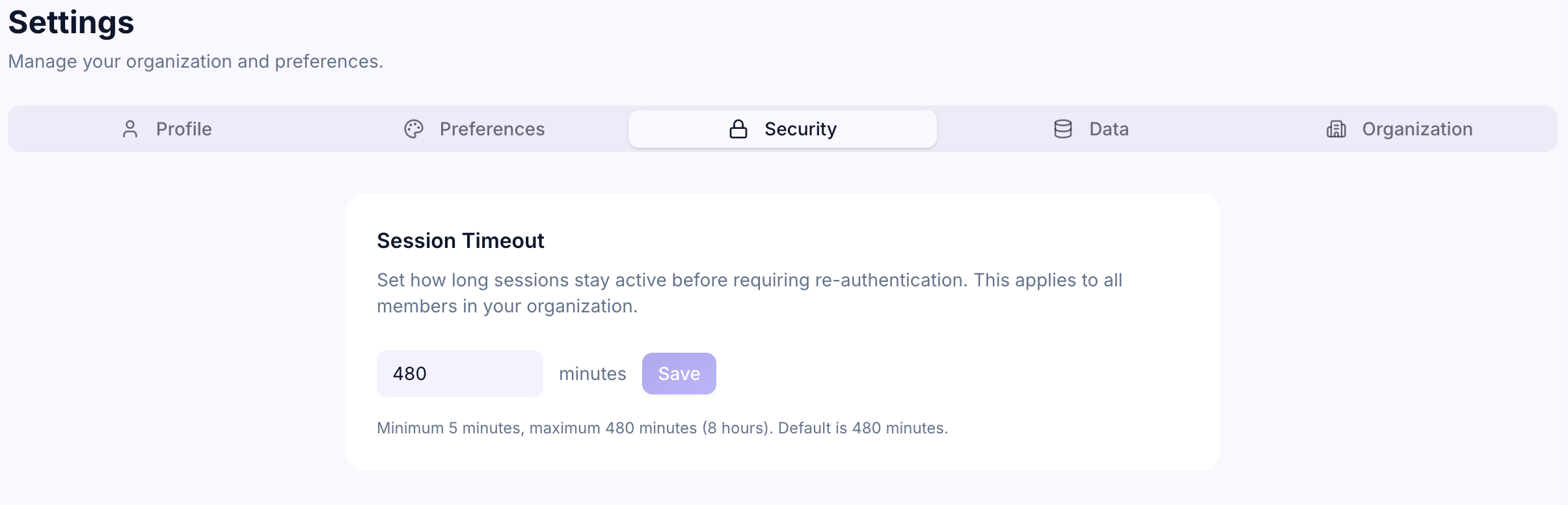
Session Timeout
Session timeout controls how long someone can be inactive before they're automatically logged out.
To set session timeout:
- Go to Security settings
- Find Session Timeout
- Choose a duration: 15 minutes, 30 minutes, 1 hour, 4 hours, or 8 hours
- Click Save
Why it matters: Shorter timeouts (15–30 minutes) are more secure but may be inconvenient for users. Longer timeouts (4–8 hours) are more convenient but less secure. Choose based on your organization's security posture.
Default: 4 hours
Password Policy
If your organization uses email/password login (not federated login), you can configure password requirements.
Available settings:
- Minimum length — How many characters passwords must be (default: 8)
- Require uppercase — Must include at least one uppercase letter (default: enabled)
- Require numbers — Must include at least one number (default: enabled)
To update password policy:
- Go to Security settings
- Find Password Policy
- Adjust the settings
- Click Save
These requirements apply to new passwords and password changes. Existing passwords are not affected.
Audit Log Retention
The audit log records all activity in your workspace. You can control how long logs are retained.
To set retention:
- Go to Security settings
- Find Audit Log Retention
- Choose a duration: 30 days, 90 days, 1 year, or indefinite
- Click Save
Why it matters: Longer retention is useful for compliance and investigations, but uses more storage. Shorter retention protects privacy but limits historical visibility.
Default: 1 year
Email Notifications
Control whether team members receive email notifications:
To manage notifications:
- Go to Security settings
- Find Email Notifications
- Toggle notifications on/off
- Click Save
When turned off, users still see in-app notifications but don't receive emails about:
- Comments on their goals
- @mentions
- Milestone deadlines
- Status changes
Two-Factor Authentication (2FA)
2FA adds an extra layer of security by requiring a second form of verification (like a code from your phone) when logging in.
Current status: 2FA is not yet available in Mentora. It's on the roadmap and coming in a future release.
Data Export & Compliance
You can export your organization's data for compliance, backup, or analysis purposes.
To export data:
- Go to Settings
- Select the Data tab
- Click Export All Data
- Choose your format: CSV or JSON
- Click Download
The export includes all goals, milestones, tasks, and activity history.
GDPR & Data Privacy
Mentora is designed with privacy and compliance in mind:
- Data ownership — Your data belongs to your organization
- Encryption in transit — All data is encrypted when traveling to/from Mentora
- Audit log — Track all access and changes
- Data deletion — Users can be deactivated (data preserved) or data can be deleted on request
- Right to access — Users can request and download their data anytime
Compliance Standards
Mentora is building towards:
- SOC 2 compliance — Security and availability standards
- GDPR compliance — EU data protection regulations
- HIPAA readiness — Healthcare data protection (coming)
Contact support if you have specific compliance requirements.
Troubleshooting
Session timeout is too short/long for my team
Go to Security settings and adjust the Session Timeout. Changes take effect immediately for new logins.
I want to see who accessed what
Check the Audit Log. It records login, create, update, delete, and role change actions.
How long are audit logs kept?
By default, 1 year. You can change this in Security settings under Audit Log Retention.
Is my data encrypted?
Yes. All data is encrypted when traveling to and from Mentora. Encryption in storage is being evaluated.
Can I delete someone's data?
Yes, but we recommend deactivating them first (which preserves data). Contact support to permanently delete user data.